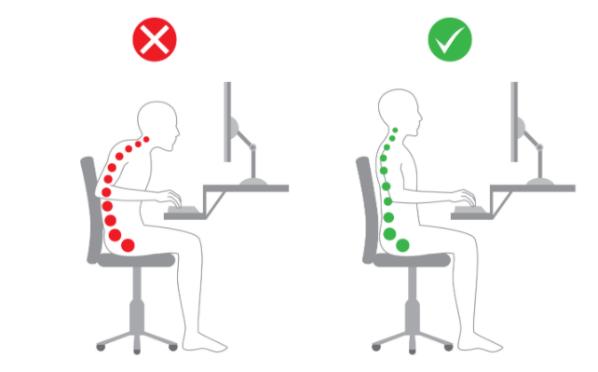

Display Screen Equipment (DSE) includes any devices with a digital display screen e.g. desktop computer screens, laptops, touch screen. The main goal of DSE assessments in the workplace according to The Health and Safety (Display Screen Equipment) Regulations 1992, is to Reduce the risk of health issues associated with screen use. If you use DSE for a considerable part of your working day e.g. an hour or more continuously, you may experience or likely to experience a range of health issues:
- Fatigue
- Eye strain
- Upper limb problems e.g. aches, pains and strains of fingers, wrists, shoulders, neck
- Backache
- Headaches
- RSI (repetitive strain injuries)
These issues can be caused or magnified by poor posture, poor environment:
- Poorly designed workstations – desk, chair, keyboard, screen.
- Poor environment – inadequate or to much lighting, to hot or too cold, to much noise.
Main Points
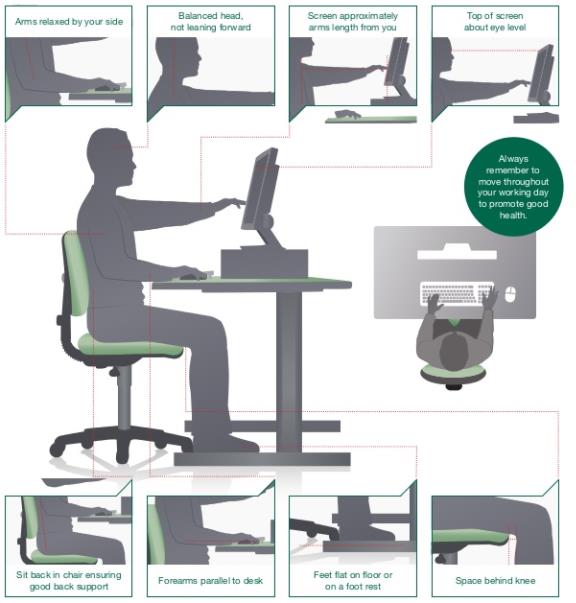
- Make sure you get a comfortable position at the workstation – learn how to adjust the height, tilt and lumbar support of your chair and correctly position your keyboard, mouse and screen.
- Position your screen at approximately arm’s length away (18-24 inches or 45-60cm) from you when in your chair with the top of the screen roughly eye level.
- Keep the space under your desk free from clutter to reduce the potential of bad posture.
- Keep your desk free from clutter.
- Arrange the desk to reduce glare or bright reflection.
- Take regular breaks if continued work is likely – about 5 to 10 minutes every hour.
- Stretch and change position regularly.
- Occasionally look into the distance and blink often.
- Adjust the size of the screen text on the screen to enable you to read easily when in your normal seating position.
- Keep your wrists in line with your arm when typing. Your fore arms should be about horizontal with your keyboard (at or below elbow level).
- Keep a clear space between your keyboard and the edge of the desk to allow you to rest your arms.
- Rest your feet flat on the floor or on a footrest when seated.
- If you experience any headache, headaches, sore wrists, shoulder, and neck ache report it to your line manager immediately.
- Report any issues with your eyesight that you think may relate to working in front of a computer monitor or screen.
- Use a headset if you have to use a phone and a computer at the same time.